Chapter 03: Noise Generators & Sampler
12 noise types, Karplus-Strong physical modeling, sample player, Slicing editor, and Slice Beat drum-loop slicing onto the steps.
3.1 The Role of Noise, Textures & Sampling in the Groovebox
Noise, physical resonators, and audio samples are fundamental sound design elements in TOMiC — not just for snares, claps, and cymbals, but for physical string models (Karplus-Strong), retro 8-bit chiptune soundscapes, clocked sample-and-hold textures, sweeping resonant filter banks, and multi-variant sample playback (vocal chops, acoustic breaks, melodic one-shots). In TOMiC, the noise & sampler section is a full-featured dual sound engine equipped with dedicated envelopes, an 8-slot filter chain, and granular processors. Each layer (A/B) includes two independent generators: NOISE 1 and NOISE 2.
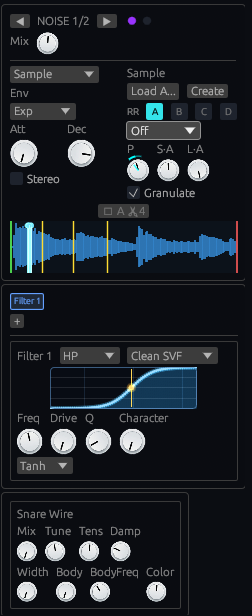
Noise & Sample Processor Interface
Figure 3.1: Noise generators interface (NOISE 1 & NOISE 2).
3.2 Generated Noise Types (NoiseType)
For NOISE 1 and NOISE 2, you can select one of 15 noise algorithms:
| Noise Type | Description |
|---|---|
| White | Flat spectral density across all audible frequencies. Classic crisp noise for hi-hats and 808-style snares. |
| Pink | 3 dB per octave energy drop. Warmer and more natural timbre matching human auditory perception. |
| Brown | 6 dB per octave drop (Brownian motion). Warm, dense, and deep — ideal for sub-rumble and dark ambient textures. |
| Metallic | Dense metallic resonance generator (tune/feedback/damp controls) engineered specifically for hi-hats, cymbals, and metallic percussion. |
| Velvet | Impulsive noise with smooth perceptual characteristics — randomly spaced pulses producing smooth velvet texture. |
| Sample | Audio file playback (WAV/FLAC). Allows loading any user sample as a noise layer. |
| KarplusStrong | Physical modeling string module (karplus.rs). A noise burst feeds a feedback delay line with a one-pole low-pass in the loop, giving a pitched, naturally-decaying tone. Controls: Karplus Freq, Karplus Decay, Karplus Damp. |
| Clocked | Digital sample & hold noise: a held random value is re-sampled at a controllable Clock Rate (1Hz–20kHz), with selectable interpolation (Clocked Mode: Step/Linear/Smooth), Clock Jitter, and optional Clock Key Track. |
| Cluster | Bank of up to 8 inharmonic partials (Cluster Density, 1–8) with 5 excitation algorithms (ClusterNoiseMode): SawCluster, PulseCluster, FmCluster, Fibonacci, and Phasing (a square stack with a shared slow wobble LFO). Ratio tables are irrational (square roots of primes) or Fibonacci-derived so partials never lock to simple harmonics. |
| ChiptuneLfsr | Retro 8-bit noise powered by a clocked linear feedback shift register (LfsrPoly), with selectable register widths: Nes15Bit (default), Atari7Bit, GameBoy9Bit, Custom16Bit. |
| GrainGlitch | A band-limited square/saw oscillator written into a small ring buffer and read back through one windowed grain, fed back into the oscillator as FM. Controls: Grain Freq, Grain FM (feedback index), Grain Size, and Grain Mode (SquareXor / SquareGrain / SawGrain). |
| FilterBank | A Sample & Hold or Pulse source (Fbank Source) split across 4 parallel bandpass filters at fixed centre frequencies (300/900/2200/5000Hz, Q=3), each swept by its own independent triangle LFO at a slightly different rate, then summed. Controls: Fbank Rate, Fbank Sweep. |
| Stochastic | Dynamic stochastic synthesis in the spirit of Iannis Xenakis's GENDYN: one waveform cycle is a ring of 3–16 breakpoints (Stoch Points), and every time a segment starts, its length and its end point's level take a random-walk step that bounces off its limits. Stoch Amp sets how far the levels wander (low: a living, wavering tone; high: torn-apart organic noise), Stoch Dur how far the segment lengths wander (0 locks the pitch; higher values drift and then smear it), Stoch Freq the cycle rate. Stoch Dist picks the shape of each step: Uniform (steady wander), Cauchy (calm with sudden tears), Logistic (in between), Arcsine (restless, jittery). The walk carries on from hit to hit, so no two hits are identical. |
| Bytebeat | An integer time counter clocked at Bb Rate (8 kHz is the classic rate; it is also the pitch) runs through a short bitwise formula, and the low 8 bits of the result are the output. The formulas carry their own rhythm and melody, so the sound is patterned digital noise — chirping arpeggios, modem chatter, broken-cartridge loops. Bb Formula: Sierpinski, Crowd, Melody, Bitshift, Xor, Modem, Arp, Fractal. Bb A / Bb B (1–16) are the shift amounts inside the formula; every whole step is a different pattern, so a slow LFO on them walks through patterns. Every hit restarts the formula at the same point, so hits repeat exactly. |
| Chaos | Deterministic chaotic systems run at audio rate — no random generator involved. Chaos Map: Logistic (the period-doubling cascade: tone, sub-octaves, hiss, with a calm period-3 window near the top), Crackle (sparking, frying-electric), Henon (buzzier, more vocal), CrossFm (two sines phase-modulating each other: bell-like at low settings, screaming feedback noise at high ones). Chaos Rate is the iteration rate (CrossFm: the first oscillator's frequency) and therefore the pitch; Chaos Amt walks the system from a clean tone into chaos; Chaos Color is Edge for the maps (0 = smooth glide between iterations, dark; 1 = hard steps, bright and gritty) and Ratio for CrossFm (frequency ratio of the second oscillator). |
Both Cluster and GrainGlitch/FilterBank are original, cleanroom DSP designs conceptually inspired by Eurorack noise-module algorithm families (e.g. Noise Plethora's oscillator-bank and granular-feedback noise types), not ports of any specific module's firmware.
Stochastic, Bytebeat, and Chaos all track the step pitch lock, run a decorrelated second instance on the right channel when the layer's Stereo switch is on (Chaos uses a tiny initial-condition offset, so the sides stay locked while the system is periodic and drift apart once it turns chaotic), and expose all three knobs as modulation targets (LFOs, envelopes, step lanes). They are clean-room implementations of published techniques (GENDYN-style synthesis, bytebeat, and textbook chaotic maps), not ports of any existing code.
Chaos "Character" Layer
White, Pink, Brown, and Velvet noise each expose an additional Character knob (0–100%) that blends in a distinct chaos-driven texture on top of the base algorithm:
Every noise type also carries a shared, always-on Wander layer — a slow Hénon-attractor meta-chaos that continuously nudges the Character knob's effective depth/rate over time, so a fixed dial position never repeats exactly the same way twice.
Noise Envelope
Independent of noise type, each noise generator has its own Noise Attack (0.01–500ms) / Noise Decay (5–10000ms) envelope, with a selectable curve shape (Env Mode: Exp default, Linear, or Mod). Both stages are modulation targets (NoiseAttack / NoiseDecay, Noise2Attack / Noise2Decay for NOISE 2).
3.3 Sample Slicing Editor & Sample Engine
When selecting the Sample noise type, the Sample Slice Editor module becomes available:
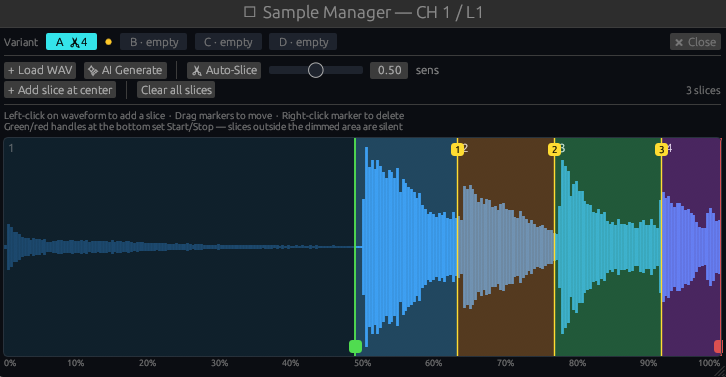
Sample Slice Editor
Figure 3.2: Waveform display and sample slice editor.
Sample Editor Controls:
SampleStart / SampleLength), not fixed sample-frame offsets.SamplePitch).slice_index / sample_start_override / sample_end_override).Slice Beat — A Drum Loop onto the Channel's Steps
The Sample Manager's 🥁 Slice Beat button turns a drum loop into a sequence the way hardware slicers do: the variant's audio is analysed as a beat, the loop is cut at its hits, and the channel is rewritten so the step sequencer plays the loop back — one slice per hit, on the hit's step, with the original micro-timing carried in the NUDGE lane — ready to be varied, re-ordered, ratcheted or randomized like any other pattern.
Round Robin (Variants A/B/C/D)
The Round Robin engine (round_robin.rs) holds a bank of up to 4 interchangeable sample variants (A, B, C, D) per noise layer, each with its own independent Start/Length window. A per-layer RR Mode (RoundRobinMode) selects how the next hit picks a variant:
Selection happens once per trigger and is latched for the whole hit, so plain playback, the granular scan window, and the UI playhead all read the same buffer. This eliminates machine-gun repetition artifacts for organic acoustic drum realism.
Embedded Sample Store
Loaded samples can be embedded directly inside the DAW session file (SampleStoreHandle), making session projects self-contained without requiring external file paths.
Hosted Instrument Plugins on the NOISE Section
The NOISE 1/2 stack can also be replaced by an external CLAP or Omniplugin instrument, via the same +CLAP / +Omni buttons found in the NOISE tile's header — see 2.10 Hosted Instrument Plugins for the full feature (host knobs, modulation, Always On, and how it combines with a plugin hosted on the OSC side of the same layer). Loading a plugin here hides Snare Wire and the Noise Filter Chain, since neither sits in the signal path once a plugin stands in for NOISE 1/2.
3.4 Noise Filter Chain (Up to 8 Slots)
Each noise layer features a dedicated chain of up to 8 filters (slot 1 is the historically-shipped flat filter_freq/filter_q pair; slots 2–8 are added FilterParams instances). The first filter is active by default; add more with the "+ Add" button.
Per-Slot Noise Filter Controls:
NoiseFilter / NoiseFilter2…NoiseFilter8, Noise2Filter for NOISE 2's own chain)NoiseFilterQ / NoiseFilter2Res…NoiseFilter8Res)NoiseFilterDrive / NoiseFilter2Drive…)NoiseFilterCharacter / NoiseFilter2Character…)FilterMode, 9 options): LowPass, HighPass, BandPass, Peaking, LowShelf, HighShelf, Notch, AllPass, PeakFilterModel, 12 circuit emulations): Clean SVF, Diode (ThreeOhThree), Moog (LittleFatty), Vintage (Grandad), Korg 35 (Japan), Formant (ChildGenius), Comb, Ladder, OB-Xd, Cutoff Warp, Res Warp, S&H — each slot 2-8's Model is itself a modulation target (NoiseFilter2Model…NoiseFilter8Model)NOISE 2 provides an identical, completely independent chain of up to 8 noise filters. (The Attack/Decay envelope described in 3.2 is a single per-noise-generator envelope, not a per-filter-slot control.)
3.5 Noise Granular Processor
The noise layers feature their own CloudsProcessor instances (noise_granular / noise_granular2, see also 2.6). Unlike the oscillator granular instances:
process_static mode, no live-recording ring buffer overhead)NoiseParams::granulate, using the same Grain Size/Pitch/Position/Freeze/Width/Density/Texture/Blend/Feedback controls as the oscillator granular layerThis allows transforming static drum samples into evolving, lush stereo particle clouds.
3.6 Snare Wire Physical Model
Each noise layer also carries an independent Snare Wire physical model — a resonant-spring simulation layered specifically for snare-style noise content, with its own complete parameter set (NOISE 2 has a fully independent copy):
3.7 Integrated Sample Browser & File Navigator

Integrated Sample Browser
Figure 3.3: Sample Browser interface view.
TOMiC features a built-in Sample Browser panel (SampleBrowser) accessible directly from the top tools bar:
.mid file — onto the GROOVE tile in the transport bar to extract a user groove (6.8.1). MIDI files are listed as drag sources only; they cannot be auditioned or loaded as samples.